ECoG and EEG recording software, laid out on your array
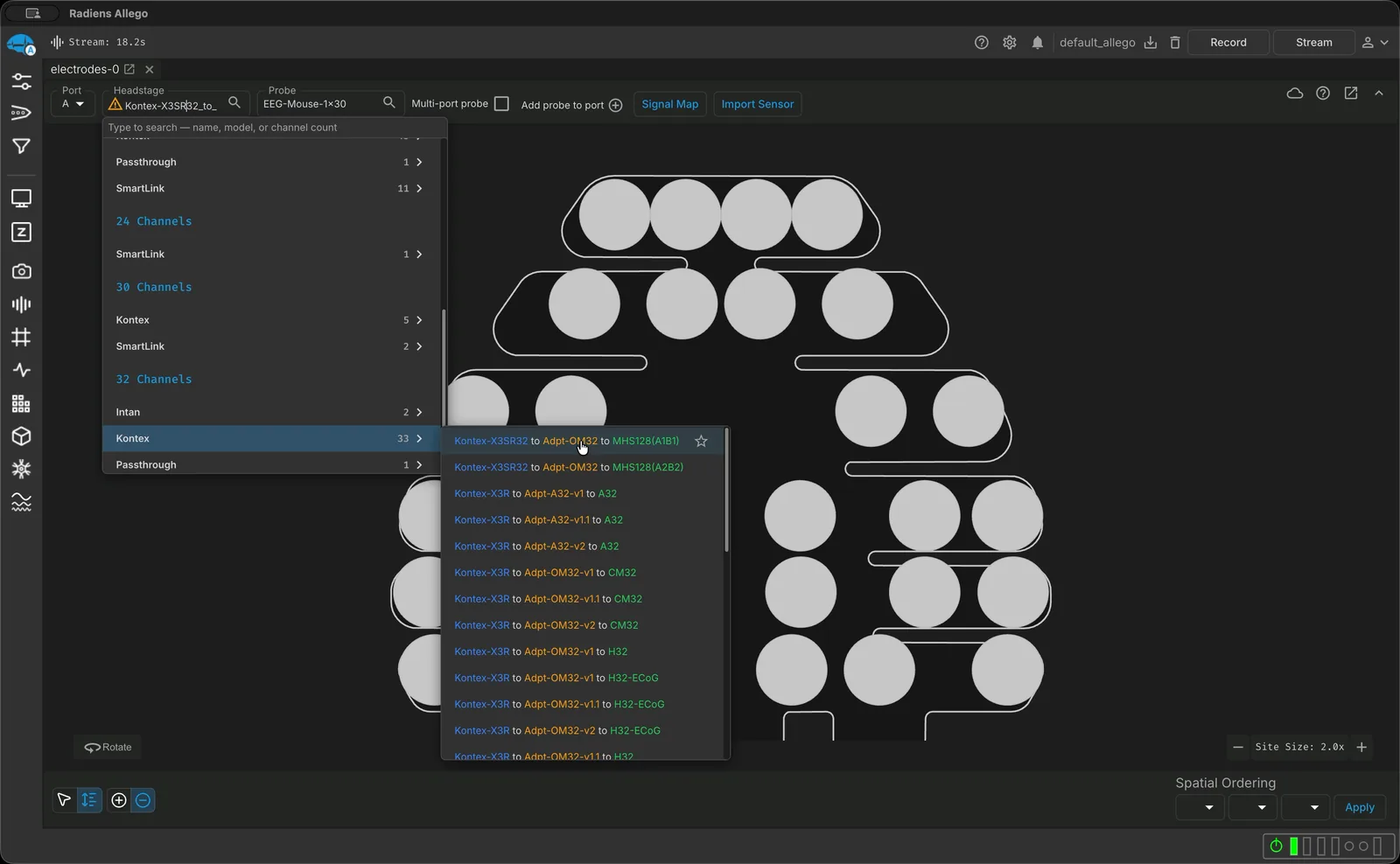
Pick the grid and the headstage it plugs into, and Radiens resolves the wiring: every channel stays on its site, from setup through analysis.
Radiens knows how your grid is wired
Radiens is NeuroNexus software for recording and analyzing ECoG and EEG grids, and it knows how your grid is wired. Each connector, adapter and headstage between the grid and the amplifier reorders the channels. Radiens has that wiring for NeuroNexus ECoG and EEG grids, so channels arrive in site order with no pinout PDF or remap spreadsheet, and it draws the grid on a 3D brain to show what each site sits over.
Choose the array, and the wiring follows
In the Electrodes tab, choose the NeuroNexus array and the headstage or adapter it plugs into. Radiens combines the site geometry with the headstage map, so channels come out in site order, and it picks the connector variant that matches your headstage.
Native ECoG and EEG models
NeuroNexus ECoG grids from 4 to 256 sites, plus mouse and rat EEG arrays.
Wiring included
ECoG and EEG maps for XDAQ X3R/X3SR adapters and SmartLink chronic headstages.
Your own layout too
Import any other grid from CSV or ProbeInterface and it registers like a native model.
See the grid on the brain
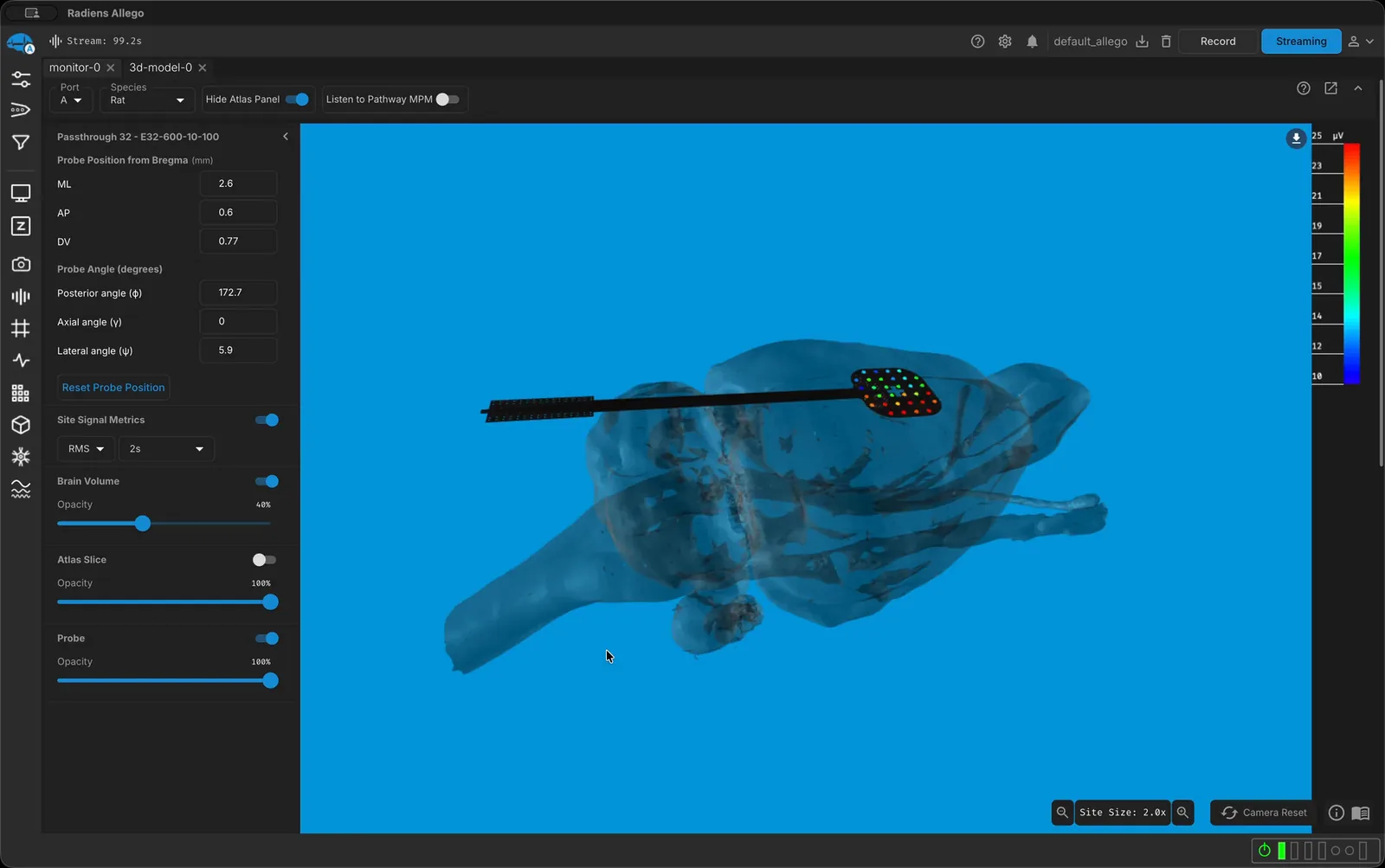
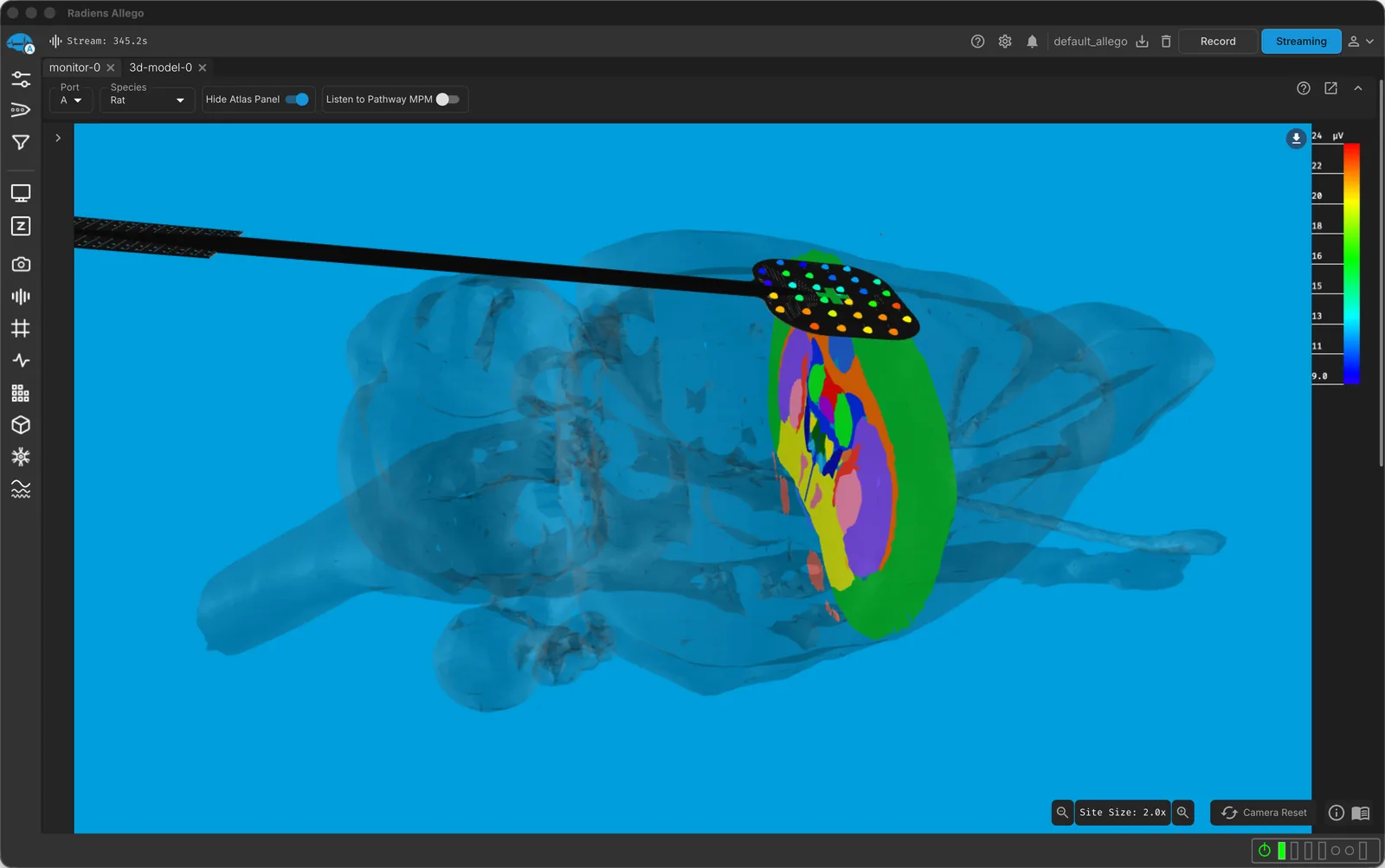
The 3D Model tab draws your grid on a rat or macaque brain model, site for site, and once you are recording it can color each site by its live signal quality. Position the grid from bregma before surgery and read which atlas regions lie under it; at Pro, set the placement angles too.
3D brain view
The grid on a 3D rat or macaque brain model, free.
Implant planning
Set the position from bregma before surgery, and the placement angles at Pro.
Atlas regions
An atlas slice showing the regions under the grid.
Impedance on the grid, before you record
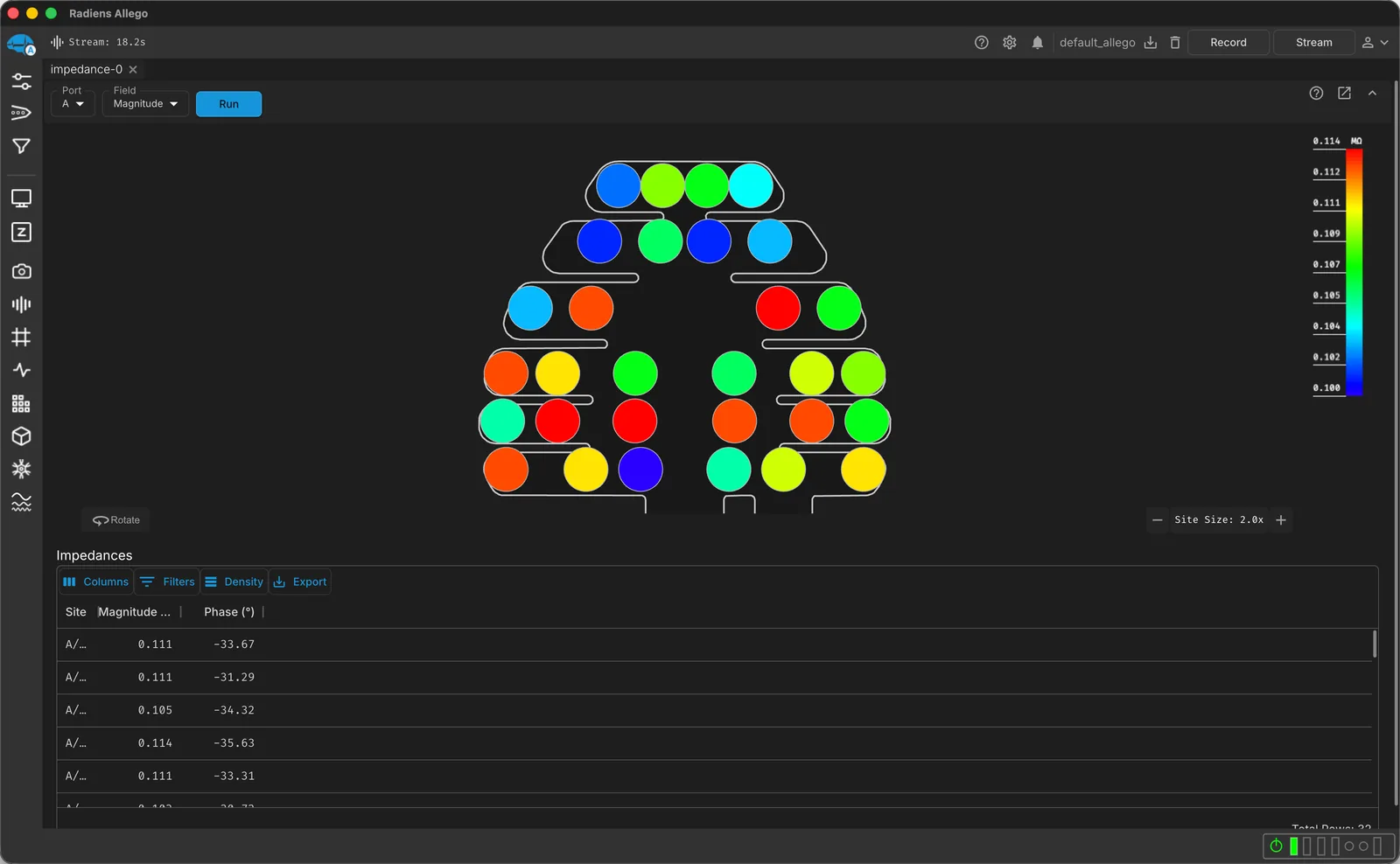
Run impedance from Allego and read magnitude and phase colored onto the array’s own layout, beside the table. A poor contact shows up as a pad on the grid, not a channel number you have to look up. Free with NeuroNexus DAQ.
Filter and reference for EEG, then record
In the Signal Processing tab, apply the EEG preset to a port in one click, then re-reference to a common average, a virtual reference or bipolar pairs. Watch a live spectrogram as you record.
EEG filter preset
A notch at your line frequency plus a 100 Hz lowpass, in one click.
Referencing
Common average, virtual, and bipolar (paired) references.
Live spectrogram
See power across frequencies change as you record.
Stimulate through the grid
On XDAQ in Stim mode, deliver stimulation through grid sites during the recording.

The layout goes with the data
The recording stores which array and headstage were on each port, so Videre opens it on the grid, and every export carries the layout.
Reassign the array
If the wrong array was assigned, reassign it in Videre; the earlier assignment is kept as a backup you can restore.
Protocols
In the Curate tab, chain filter, remap and NWB export once, save them as a protocol, and run it on every session (Pro).
The layout in every export
NWB’s electrodes table gets each site’s x, y and z and the probe ID; CSV, HDF5, NeuroExplorer and Kilosort exports too.
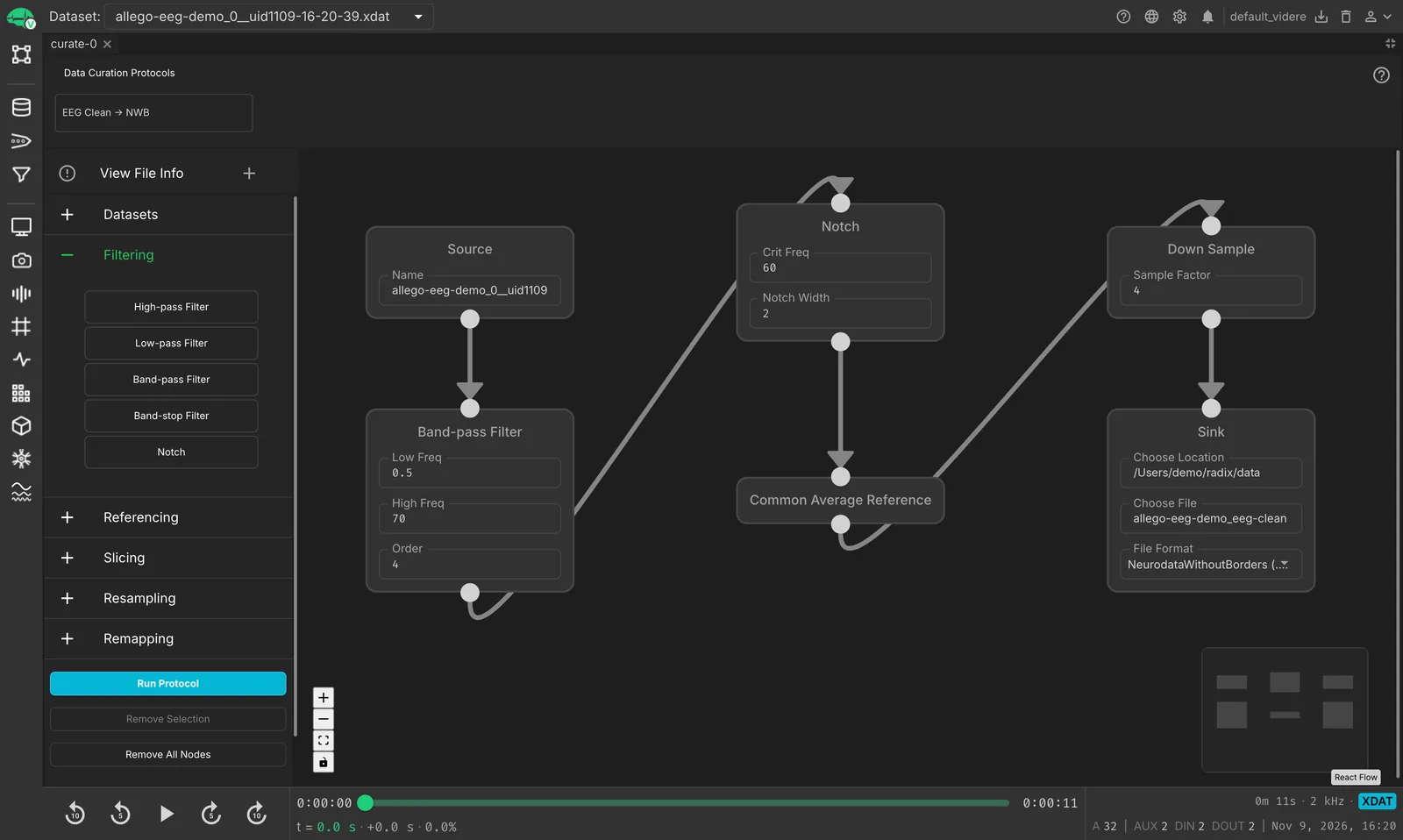
Spectra and signal quality on the array
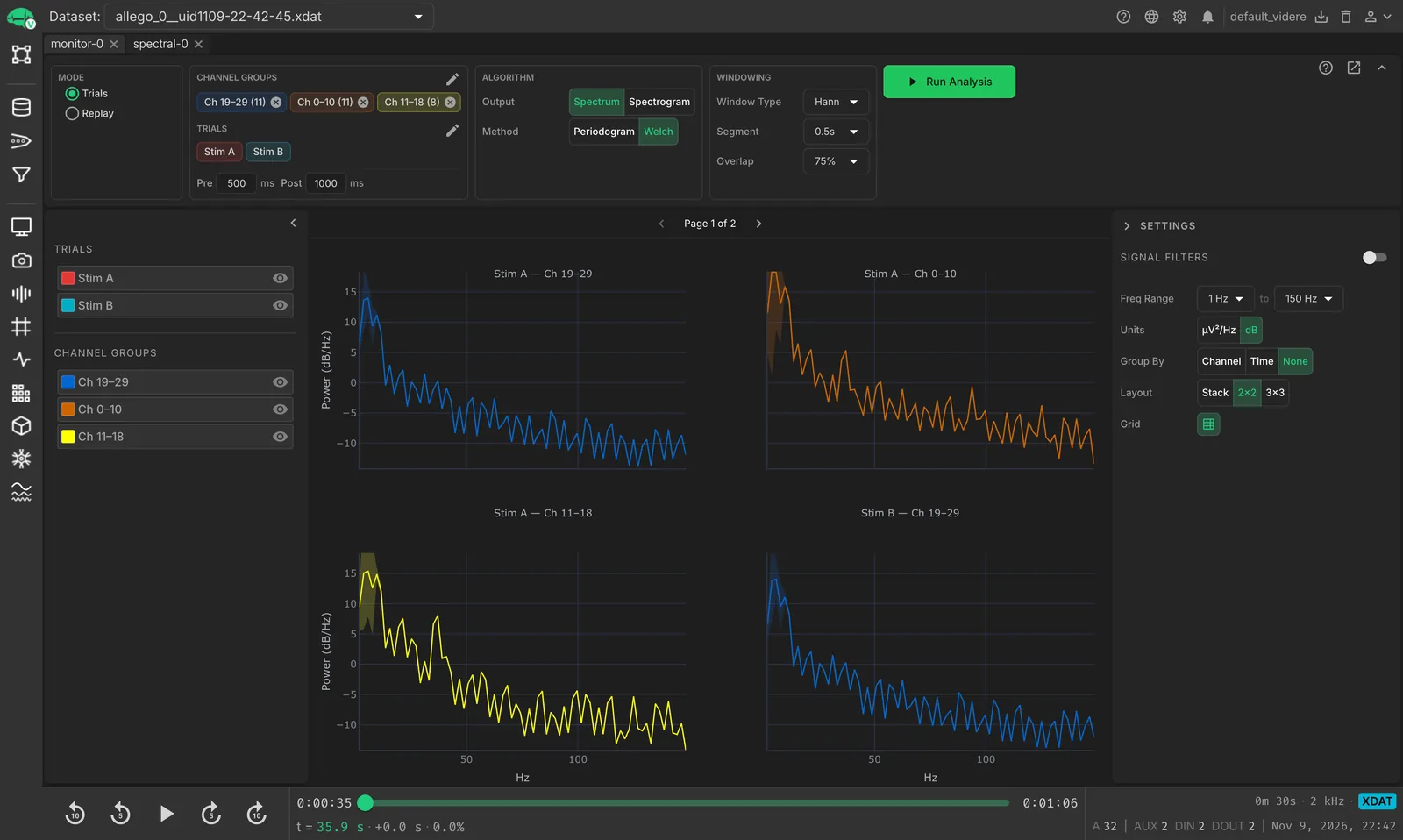
In Videre, work the spectrum and spectrogram by channel group, and read each site’s signal quality on the array’s own layout.
Spectrum and spectrogram
Power across frequencies for each channel group, or across time.
Per-site signal metrics
RMS, noise and SNR drawn on the array layout.
Trials side by side
One spectrum panel per stimulus trial and channel group.
Every channel knows its site, in code too
In RadiensPy, open a recording and every channel comes with its probe, its site number, and its position in both probe and tissue coordinates. Plot by grid layout or by brain position without rebuilding the map by hand.
%3C%2Ftspan%3E%C2%A0%3Ctspan%20fill%3D%22%23c792ea%22%3Eas%3C%2Ftspan%3E%C2%A0%3Ctspan%20fill%3D%22%23e2e8f0%22%3Evidere%3C%2Ftspan%3E%3Ctspan%20fill%3D%22%2389ddff%22%3E%3A%3C%2Ftspan%3E%3C%2Ftext%3E%3Ctext%20x%3D%2236%22%20y%3D%22192%22%3E%C2%A0%C2%A0%C2%A0%C2%A0%3Ctspan%20fill%3D%22%23e2e8f0%22%3Erec%3C%2Ftspan%3E%C2%A0%3Ctspan%20fill%3D%22%2389ddff%22%3E%3D%3C%2Ftspan%3E%C2%A0%3Ctspan%20fill%3D%22%23e2e8f0%22%3Evidere%3C%2Ftspan%3E%3Ctspan%20fill%3D%22%2389ddff%22%3E.%3C%2Ftspan%3E%3Ctspan%20fill%3D%22%2382aaff%22%3Elink_data_file%3C%2Ftspan%3E%3Ctspan%20fill%3D%22%2389ddff%22%3E(%3C%2Ftspan%3E%3Ctspan%20fill%3D%22%23c3e88d%22%3E%22my_recording.xdat%22%3C%2Ftspan%3E%3Ctspan%20fill%3D%22%2389ddff%22%3E)%3C%2Ftspan%3E%3C%2Ftext%3E%3Ctext%20x%3D%2236%22%20y%3D%22224%22%3E%C2%A0%C2%A0%C2%A0%C2%A0%3Ctspan%20fill%3D%22%23e2e8f0%22%3Echans%3C%2Ftspan%3E%C2%A0%3Ctspan%20fill%3D%22%2389ddff%22%3E%3D%3C%2Ftspan%3E%C2%A0%3Ctspan%20fill%3D%22%23e2e8f0%22%3Erec%3C%2Ftspan%3E%3Ctspan%20fill%3D%22%2389ddff%22%3E.%3C%2Ftspan%3E%3Ctspan%20fill%3D%22%23e2e8f0%22%3Echannel_metadata%3C%2Ftspan%3E%3C%2Ftext%3E%3Ctext%20x%3D%2236%22%20y%3D%22256%22%3E%C2%A0%C2%A0%C2%A0%C2%A0%3Ctspan%20fill%3D%22%23c792ea%22%3Efor%3C%2Ftspan%3E%C2%A0%3Ctspan%20fill%3D%22%23e2e8f0%22%3Entv%3C%2Ftspan%3E%C2%A0%3Ctspan%20fill%3D%22%23c792ea%22%3Ein%3C%2Ftspan%3E%C2%A0%3Ctspan%20fill%3D%22%23e2e8f0%22%3Echans%3C%2Ftspan%3E%3Ctspan%20fill%3D%22%2389ddff%22%3E.%3C%2Ftspan%3E%3Ctspan%20fill%3D%22%2382aaff%22%3Eall_amp_indices%3C%2Ftspan%3E%3Ctspan%20fill%3D%22%2389ddff%22%3E(%3C%2Ftspan%3E%3Ctspan%20fill%3D%22%2389ddff%22%3E)%3C%2Ftspan%3E%3Ctspan%20fill%3D%22%2389ddff%22%3E%3A%3C%2Ftspan%3E%3C%2Ftext%3E%3Ctext%20x%3D%2236%22%20y%3D%22288%22%3E%C2%A0%C2%A0%C2%A0%C2%A0%C2%A0%C2%A0%C2%A0%C2%A0%3Ctspan%20fill%3D%22%23e2e8f0%22%3Ech%3C%2Ftspan%3E%C2%A0%3Ctspan%20fill%3D%22%2389ddff%22%3E%3D%3C%2Ftspan%3E%C2%A0%3Ctspan%20fill%3D%22%23e2e8f0%22%3Echans%3C%2Ftspan%3E%3Ctspan%20fill%3D%22%2389ddff%22%3E.%3C%2Ftspan%3E%3Ctspan%20fill%3D%22%2382aaff%22%3Eget_channel_info%3C%2Ftspan%3E%3Ctspan%20fill%3D%22%2389ddff%22%3E(%3C%2Ftspan%3E%3Ctspan%20fill%3D%22%2382aaff%22%3Eint%3C%2Ftspan%3E%3Ctspan%20fill%3D%22%2389ddff%22%3E(%3C%2Ftspan%3E%3Ctspan%20fill%3D%22%23e2e8f0%22%3Entv%3C%2Ftspan%3E%3Ctspan%20fill%3D%22%2389ddff%22%3E)%3C%2Ftspan%3E%3Ctspan%20fill%3D%22%2389ddff%22%3E%2C%3C%2Ftspan%3E%C2%A0%3Ctspan%20fill%3D%22%23ffcb6b%22%3ESignalType%3C%2Ftspan%3E%3Ctspan%20fill%3D%22%2389ddff%22%3E.%3C%2Ftspan%3E%3Ctspan%20fill%3D%22%23ffcb6b%22%3EAMP%3C%2Ftspan%3E%3Ctspan%20fill%3D%22%2389ddff%22%3E)%3C%2Ftspan%3E%3C%2Ftext%3E%3Ctext%20x%3D%2236%22%20y%3D%22320%22%3E%C2%A0%C2%A0%C2%A0%C2%A0%C2%A0%C2%A0%C2%A0%C2%A0%3Ctspan%20fill%3D%22%2382aaff%22%3Eprint%3C%2Ftspan%3E%3Ctspan%20fill%3D%22%2389ddff%22%3E(%3C%2Ftspan%3E%3Ctspan%20fill%3D%22%23e2e8f0%22%3Ech%3C%2Ftspan%3E%3Ctspan%20fill%3D%22%2389ddff%22%3E.%3C%2Ftspan%3E%3Ctspan%20fill%3D%22%23e2e8f0%22%3Ename%3C%2Ftspan%3E%3Ctspan%20fill%3D%22%2389ddff%22%3E%2C%3C%2Ftspan%3E%C2%A0%3Ctspan%20fill%3D%22%23e2e8f0%22%3Ech%3C%2Ftspan%3E%3Ctspan%20fill%3D%22%2389ddff%22%3E.%3C%2Ftspan%3E%3Ctspan%20fill%3D%22%23e2e8f0%22%3Eprobe_id%3C%2Ftspan%3E%3Ctspan%20fill%3D%22%2389ddff%22%3E%2C%3C%2Ftspan%3E%C2%A0%3Ctspan%20fill%3D%22%23e2e8f0%22%3Ech%3C%2Ftspan%3E%3Ctspan%20fill%3D%22%2389ddff%22%3E.%3C%2Ftspan%3E%3Ctspan%20fill%3D%22%23e2e8f0%22%3Esite_num%3C%2Ftspan%3E%3Ctspan%20fill%3D%22%2389ddff%22%3E%2C%3C%2Ftspan%3E%3C%2Ftext%3E%3Ctext%20x%3D%2236%22%20y%3D%22352%22%3E%C2%A0%C2%A0%C2%A0%C2%A0%C2%A0%C2%A0%C2%A0%C2%A0%C2%A0%C2%A0%C2%A0%C2%A0%C2%A0%C2%A0%3Ctspan%20fill%3D%22%2389ddff%22%3E(%3C%2Ftspan%3E%3Ctspan%20fill%3D%22%23e2e8f0%22%3Ech%3C%2Ftspan%3E%3Ctspan%20fill%3D%22%2389ddff%22%3E.%3C%2Ftspan%3E%3Ctspan%20fill%3D%22%23e2e8f0%22%3Eprobe_x%3C%2Ftspan%3E%3Ctspan%20fill%3D%22%2389ddff%22%3E%2C%3C%2Ftspan%3E%C2%A0%3Ctspan%20fill%3D%22%23e2e8f0%22%3Ech%3C%2Ftspan%3E%3Ctspan%20fill%3D%22%2389ddff%22%3E.%3C%2Ftspan%3E%3Ctspan%20fill%3D%22%23e2e8f0%22%3Eprobe_y%3C%2Ftspan%3E%3Ctspan%20fill%3D%22%2389ddff%22%3E)%3C%2Ftspan%3E%3Ctspan%20fill%3D%22%2389ddff%22%3E%2C%3C%2Ftspan%3E%3C%2Ftext%3E%3Ctext%20x%3D%2236%22%20y%3D%22384%22%3E%C2%A0%C2%A0%C2%A0%C2%A0%C2%A0%C2%A0%C2%A0%C2%A0%C2%A0%C2%A0%C2%A0%C2%A0%C2%A0%C2%A0%3Ctspan%20fill%3D%22%2389ddff%22%3E(%3C%2Ftspan%3E%3Ctspan%20fill%3D%22%23e2e8f0%22%3Ech%3C%2Ftspan%3E%3Ctspan%20fill%3D%22%2389ddff%22%3E.%3C%2Ftspan%3E%3Ctspan%20fill%3D%22%23e2e8f0%22%3Etissue_x%3C%2Ftspan%3E%3Ctspan%20fill%3D%22%2389ddff%22%3E%2C%3C%2Ftspan%3E%C2%A0%3Ctspan%20fill%3D%22%23e2e8f0%22%3Ech%3C%2Ftspan%3E%3Ctspan%20fill%3D%22%2389ddff%22%3E.%3C%2Ftspan%3E%3Ctspan%20fill%3D%22%23e2e8f0%22%3Etissue_y%3C%2Ftspan%3E%3Ctspan%20fill%3D%22%2389ddff%22%3E%2C%3C%2Ftspan%3E%C2%A0%3Ctspan%20fill%3D%22%23e2e8f0%22%3Ech%3C%2Ftspan%3E%3Ctspan%20fill%3D%22%2389ddff%22%3E.%3C%2Ftspan%3E%3Ctspan%20fill%3D%22%23e2e8f0%22%3Etissue_z%3C%2Ftspan%3E%3Ctspan%20fill%3D%22%2389ddff%22%3E)%3C%2Ftspan%3E%3Ctspan%20fill%3D%22%2389ddff%22%3E)%3C%2Ftspan%3E%3C%2Ftext%3E%3C%2Fsvg%3E)
One recording chain, engineered together
The grids, headstages and acquisition systems in this workflow are NeuroNexus parts, designed alongside Radiens and usable à la carte.
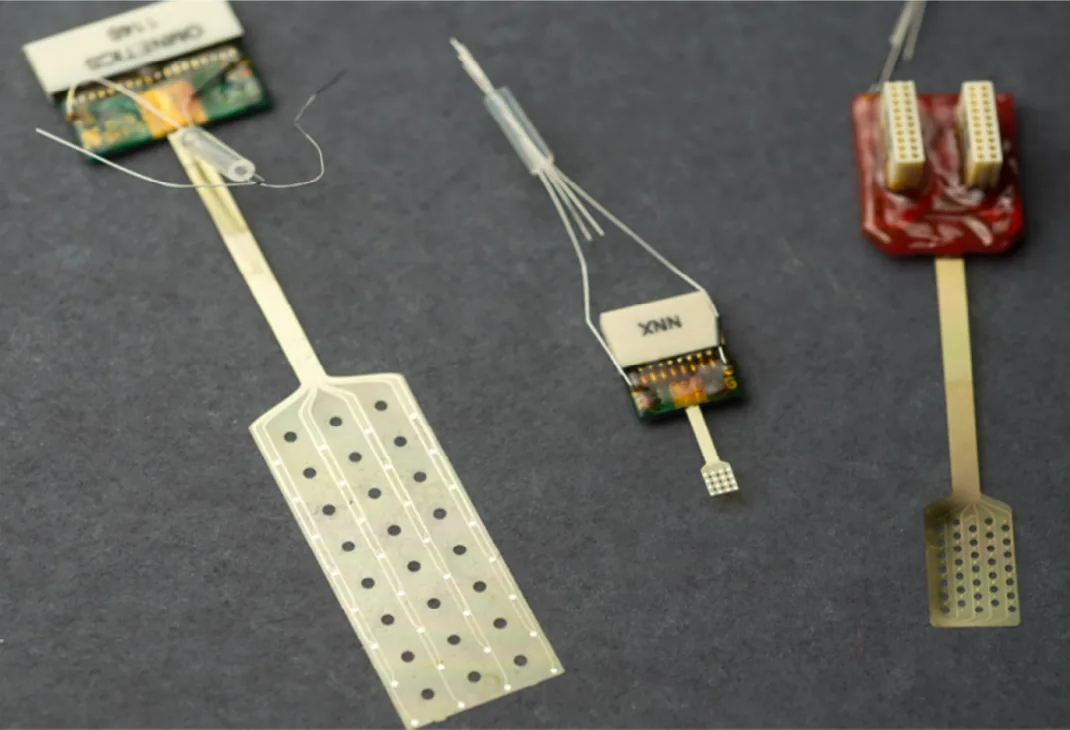
ECoG grids
Thin-film grids for the cortical surface, placed epidurally or subdurally.
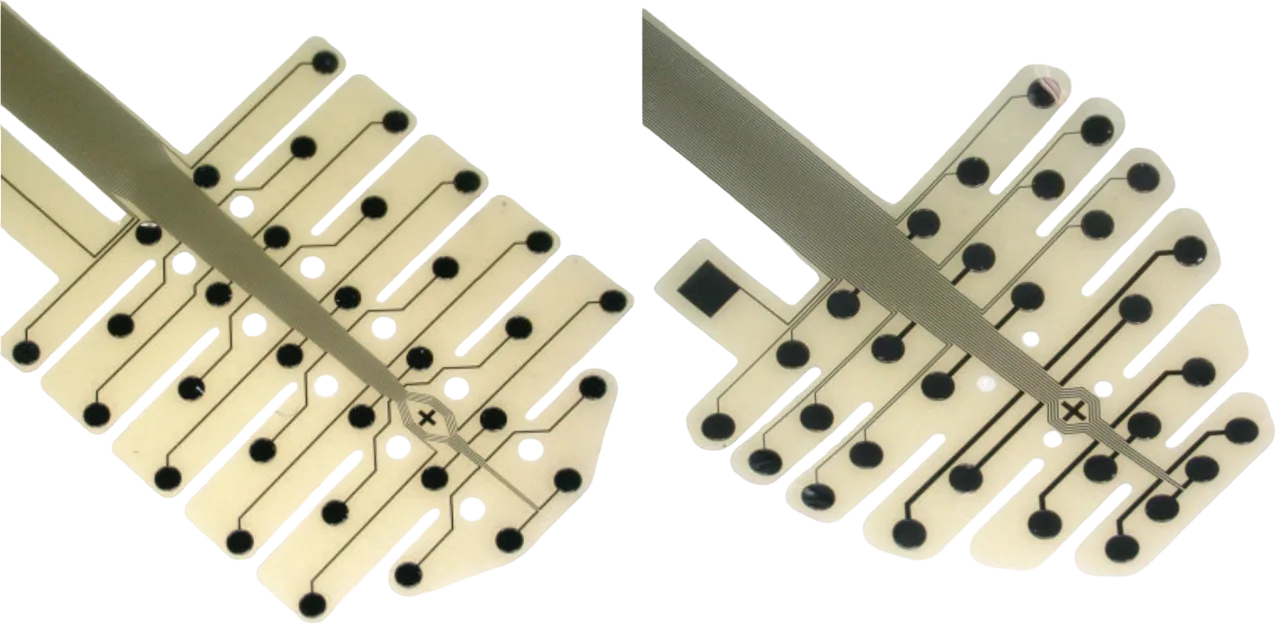
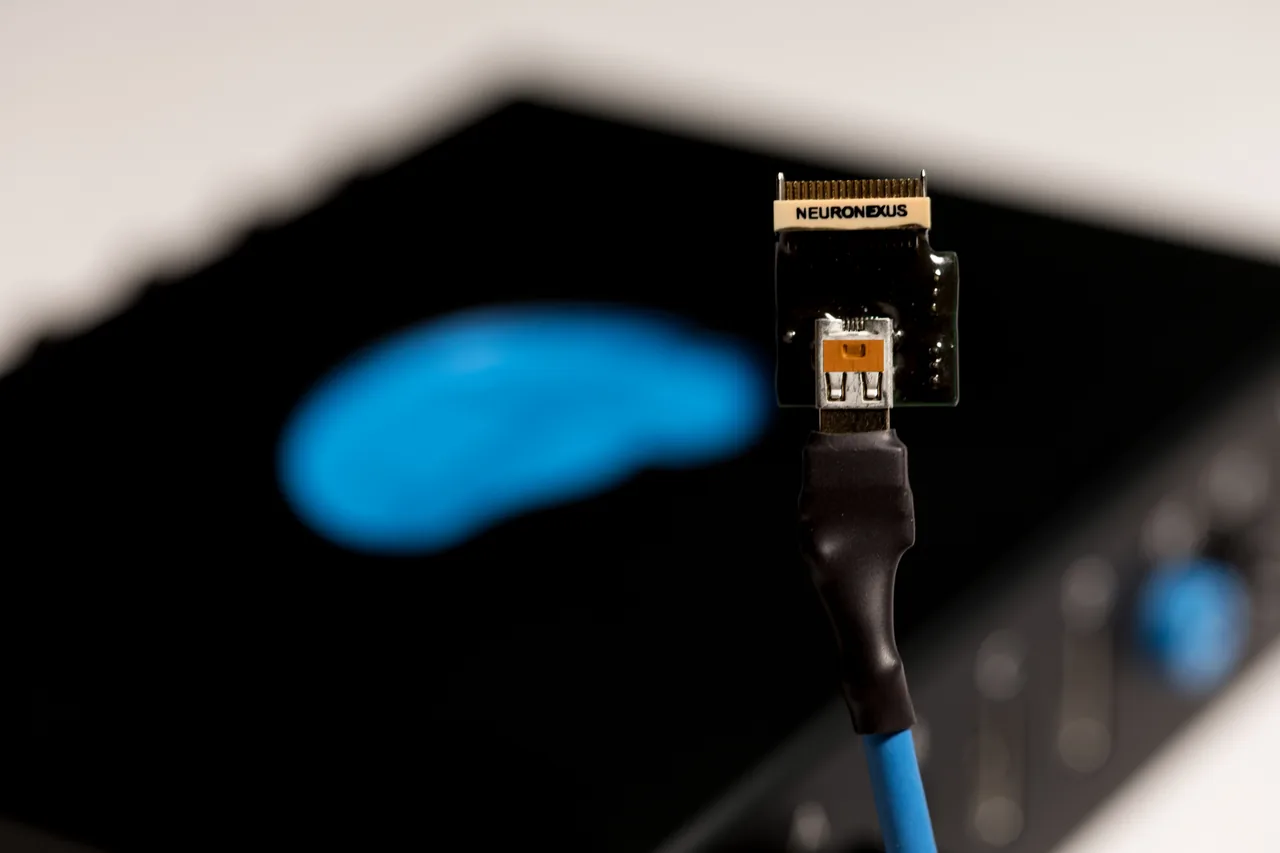
Headstage and DAQ
Pin your grid in the Connection Finder (beta) to see which headstages, adapters and acquisition systems join it, with Radiens across the chain.
ECoG and EEG in Radiens — FAQ
Does Radiens detect which array is plugged in?
Allego detects the channel count on each port, and you choose the array. Every recording stores the array and headstage on each port, and saving your workspace keeps the setup for next time.
Can I use a grid that is not in the library?
Yes. Import its layout from CSV or ProbeInterface JSON and it registers like a native model, free.
Which brain models does the 3D view use?
Rat and macaque. Drawing the grid on the brain, positioning it from bregma and reading atlas regions are free; setting the placement angles is Pro.
Do I need NeuroNexus acquisition hardware?
No. Videre opens recordings from Intan, Open Ephys, Blackrock and TDT systems. With Open Live (Pro), Videre follows a recording while your acquisition software is still writing it, and the finished file is ready to analyze in the same place.
Have NeuroNexus ECoG and EEG grids been used in published studies?
Yes. A significant and growing set of published studies uses NeuroNexus ECoG and EEG grids. Ask Oaks, the site's advisor, for example studies.
Which software records NeuroNexus ECoG and EEG grids?
Radiens, the NeuroNexus electrophysiology software. Its acquisition app, Allego, carries native models of NeuroNexus ECoG grids from 4 to 256 sites and of mouse and rat EEG arrays. It includes the wiring for XDAQ adapters and SmartLink headstages, so channels arrive in site order. Videre analyzes the recordings.
Can I export ECoG and EEG recordings with electrode positions?
Yes. A Radiens recording stores which array and headstage were on each port, and every export carries the layout. In NWB, the electrodes table gets each site's x, y and z position and the probe ID. CSV, HDF5, NeuroExplorer and Kilosort exports carry the layout too. NWB export is in the free Standard tier.